Tenth Triage · AI SOC analyst
AI SOC analyst for alert triage and escalation
Tenth Triage lets you choose which severities it handles. Switch off Critical and High and your analysts get every one. Every case is explained in plain English.
The problem
Alert volume outruns your people.
Most alerts are routine. They still have to be read, and the ones that matter get lost among them.
- Noise buries the CriticalsLow and Medium alerts fill the queue, so a Critical waits behind them.
- Analysts burn outPeople spend the day on cases that never mattered, and the work does not end.
- Escalations get missedAn escalation is sent, nobody answers, and nobody chases it.
What the AI SOC analyst does
From alert to decision.
- Groups alerts into casesRelated alerts become one case.
- Judges and explainsEach case gets a verdict and the reasons, in plain English.
- Closes the routine onesCases at the severities you choose that pass the close rule are closed, with the reason recorded.
- Hands up the restSwitch off Critical and High and your analysts get every one, with the explanation ready.
How it works
What Tenth Triage does.
- A fixed close ruleA case closes only on a checked Resolve. It is asked again, disagreement escalates, then the client’s recent cases are checked. Any doubt escalates.
- Service levels and chasing built inEscalation goes to contacts in order, by email, voice or both. It chases overdue cases and hands them up when nobody answers.
- Runs on our SIEM or yoursOn Tenth Signal, or on the SIEM you already run, through an API key you create and own.
Safety
Five checks before any close.
You choose which severities it handles.
- Severity switch: you choose which severities it handles. Switch off Critical and High and your analysts get every one.
- Same workstation: it checks whether another case on the same workstation was escalated in the last 24 hours.
- Attack stages: it checks whether 3 or more cases cover 4 or more attack stages within 72 hours.
- Named tools: a fixed list of named malware and attack-tool families is always escalated.
- Held back: privileged account, raised severity, reopened case or failed domain check.
- Result: the case is closed with reasons, or sent to a person. If any check trips, it is sent to a person.
Sample data. Looping illustration.
The case
One case, fully explained.
- Grouped into one questionThe same alert on the same accounts or machines becomes one question to the client: Expected, Real issue, or Not sure.
- Did anything succeed?Each case shows whether anything succeeded, who and what was involved, the timing, and prior cases.
- Attack-stage stripWhere the activity sits in an attack, with MITRE ATT&CK techniques.
- Evidence timelineEvery event on the case, in order.
- AI verdict and plain-English adviceWhat it thinks, why, and what to do next.
- JSON exportTake the case out as JSON.
Service levels and roles
Clocks, contacts and permissions.
- SLA clocksAcknowledge, respond and resolve clocks for each severity, in business hours or 24x7.
- Escalation rulesEmail or phone, ordered contact lists with hours, and an automatic hand-on when nobody answers within the SLA.
- Roles and permissionsSOC Analyst, Senior Analyst, Manager and Administrator, with per-person permissions.
What it does
What it handles, and what needs a person.
On its own
- Collects alerts and groups them into cases.
- Judges each case and explains it.
- You choose which severities it handles.
- Flags when the same kind of case was escalated before.
- Suggests rules and tests them on real cases before anyone is asked to approve.
- Chases overdue cases and hands them up when nobody answers.
- Produces the reports.
Needs a person
- Every case at a severity you leave off, including Critical and High if you switch them off.
- Containing a threat: a person presses the button, or turns on and approves automatic containment.
- Yes or no on rules.
- Talking to the client.
How triage works
One case in. One verdict out.
Automated Review returns Resolve, Escalate, or Unsure, so escalate. Each with short reasoning and the rules it used.
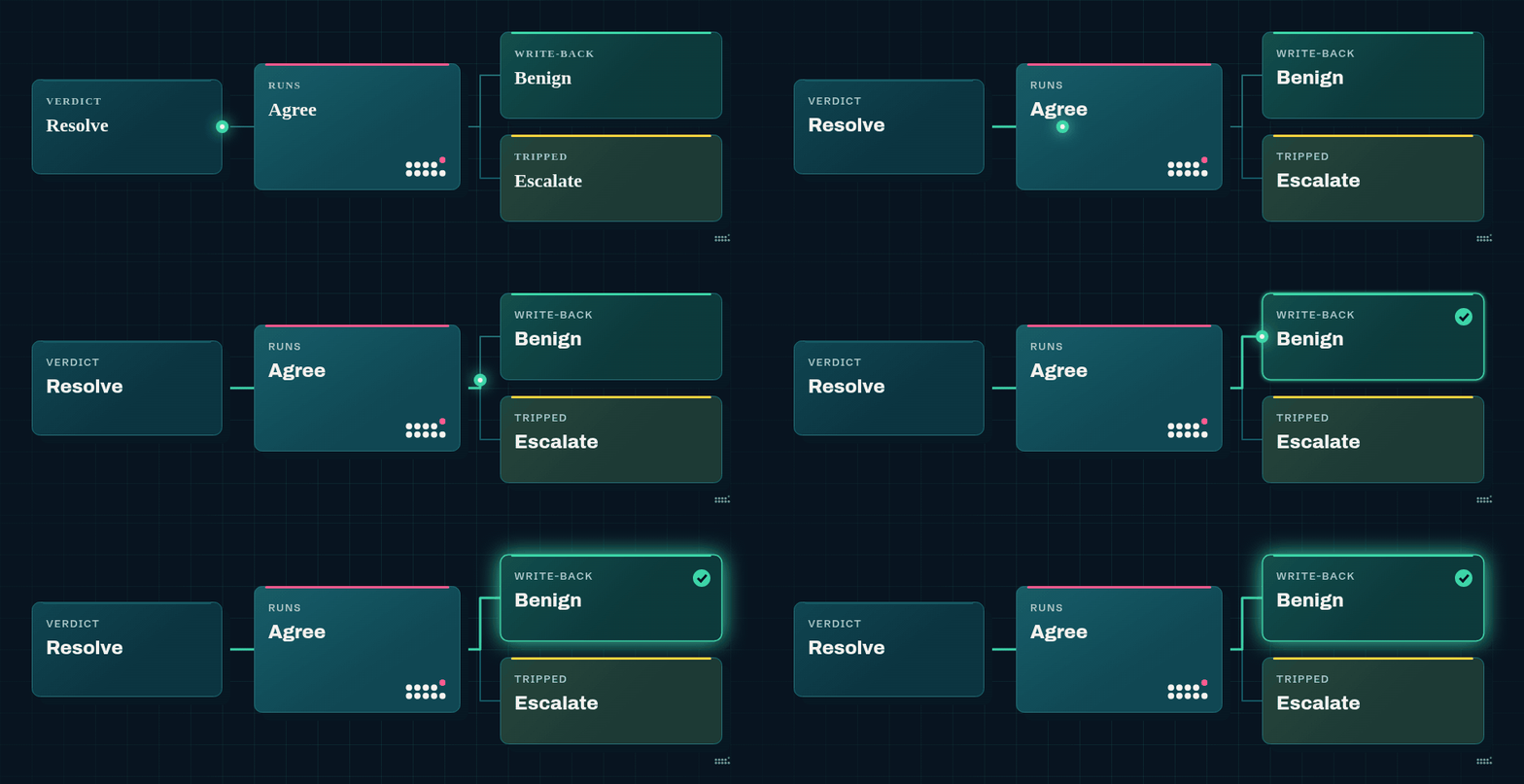
Sample data · illustrative · motion pauses when reduced-motion is on
- ResolveChecked again with repeat runs, then pre-close checks. A clear Resolve is recorded as routine, with its reasons.
- EscalateStarts the escalation path: contacts in order, email, voice or both.
- Unsure, so escalateTreated like Escalate. There is no review queue to get lost in.
Doubt always escalates. If your team already acted, it stands down. Severity never changes.
Outcomes
Analyst hours back. Escalations that land. Proof on record.
- Analyst hours backRoutine cases are sorted with a reason on record, so your team spends time on cases that need them.
- Escalations that landContacts are tried in order, by email, voice or both, with every attempt recorded.
- Proof on recordWho was contacted, what was closed, and why. On the case and in reports.
- Sample data
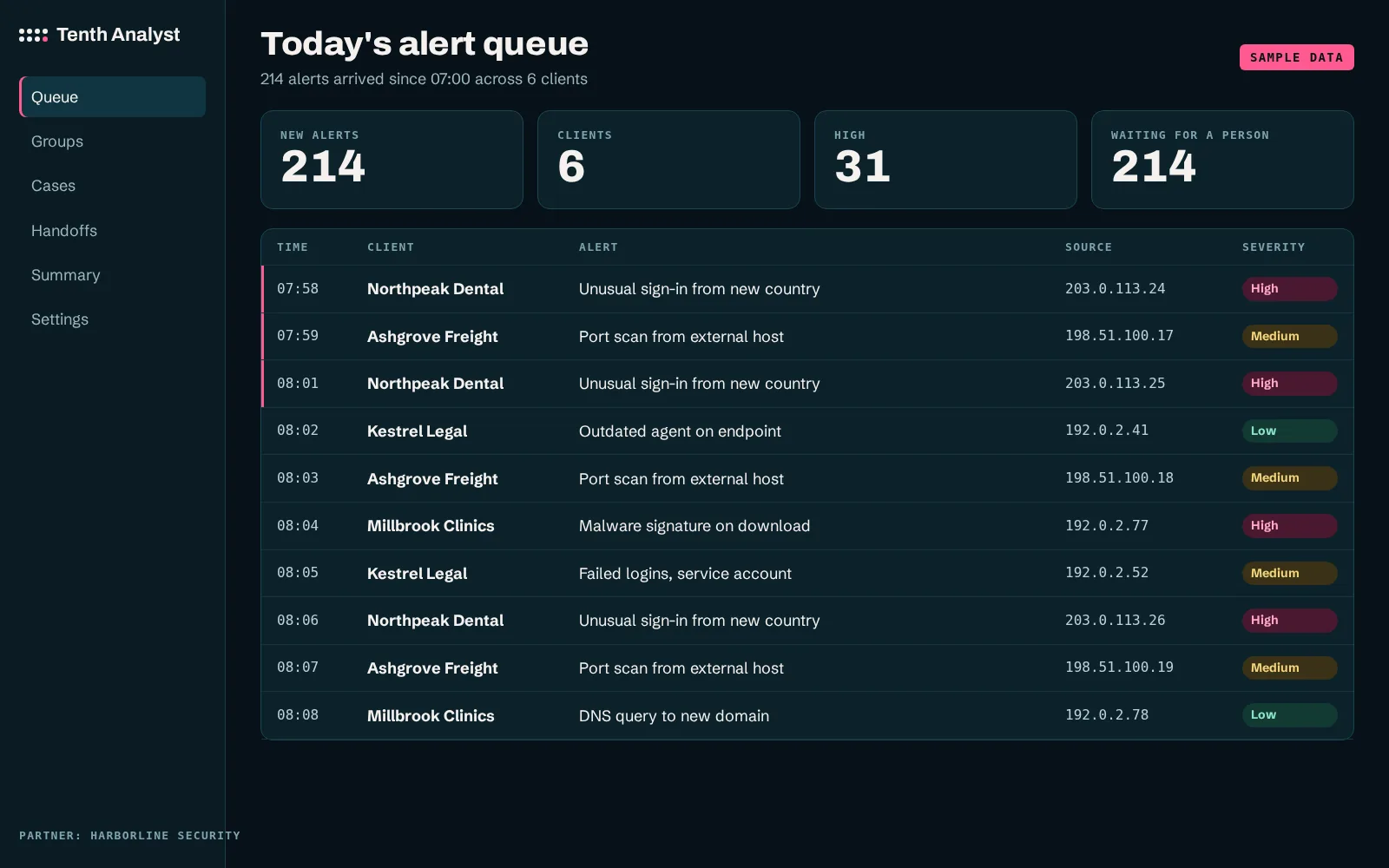
Today's alert queue arrivingThe day starts with 214 alerts across 6 clients. - Sample data
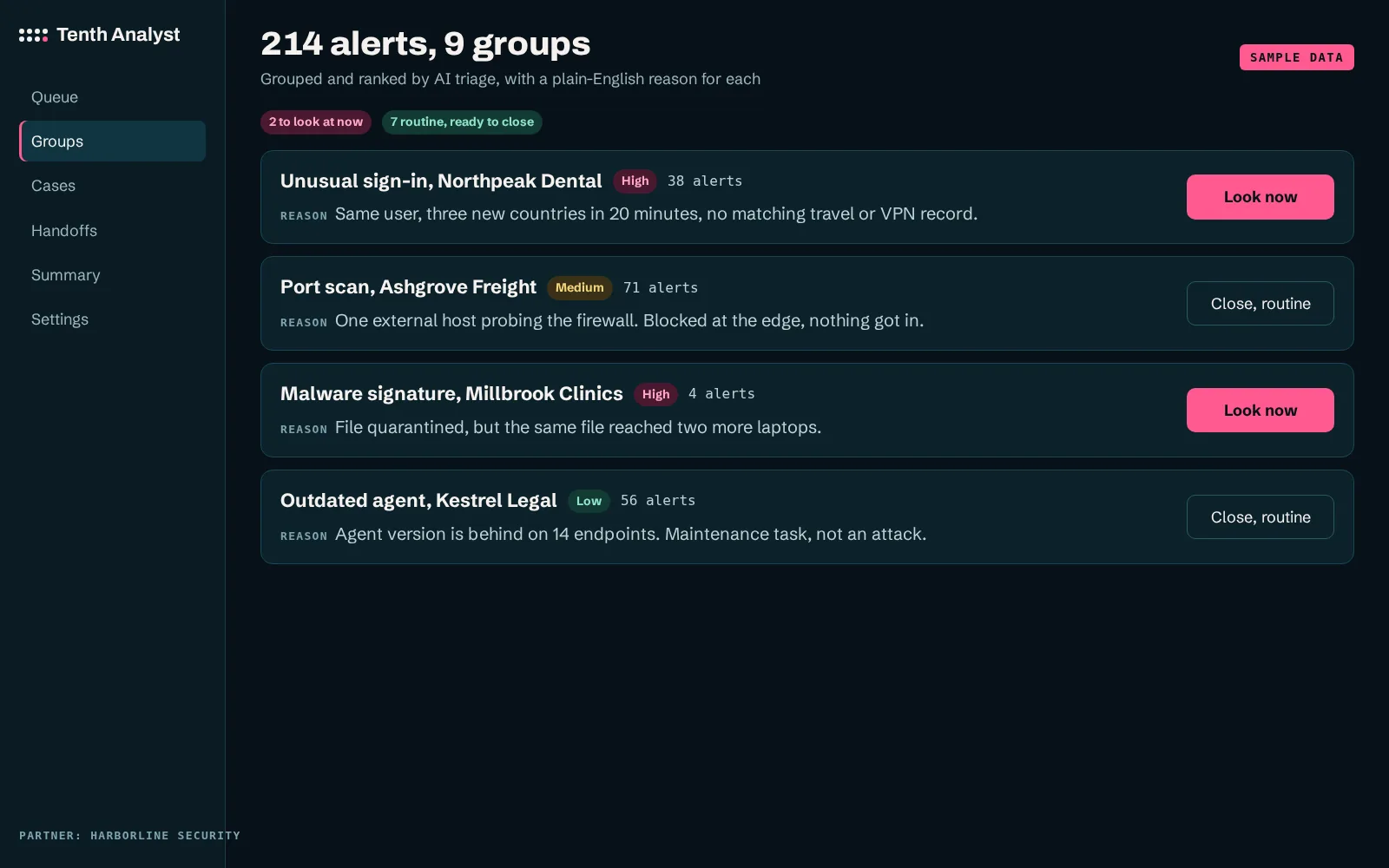
Grouped and ranked, with a reasonAI triage turns 214 alerts into 9 groups. 2 need a person. - Sample data
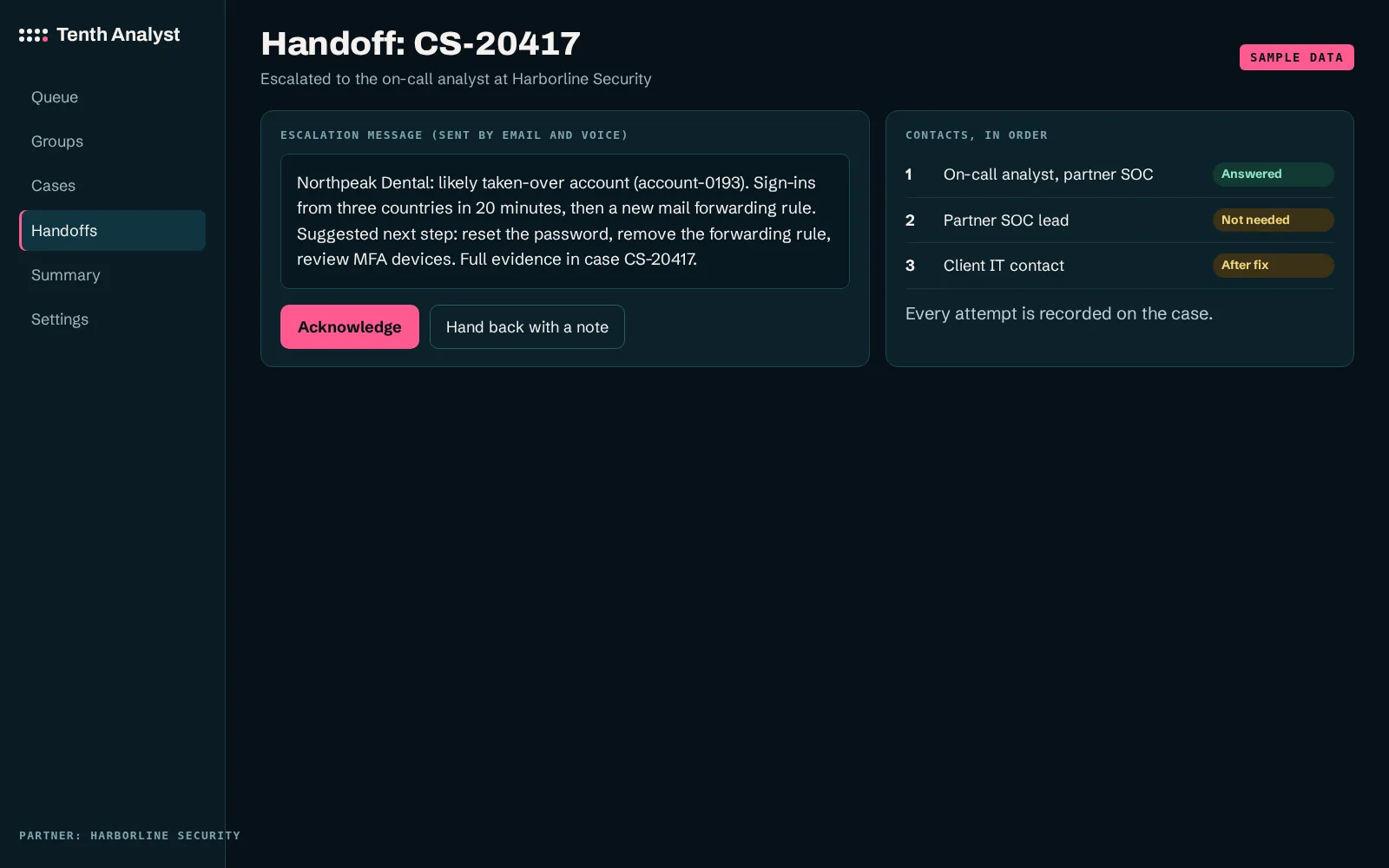
Handoff with an escalation messageThe on-call analyst gets a plain message and the next step.
Go live in stages
Go live in stages.
Roll Tenth Analyst out in stages, not all at once. Once it is live, you choose which severities it handles. Switch off Critical and High and your analysts get every one.
- Go live in stagesMove forward at your own pace
- You choose the severitiesYou pick which ones it handles
- People decideEvery case at a severity you leave off
Also in the product
More ways it takes work off your team.
- Automatic containmentIsolate a machine or disable an account automatically. A person turns it on or approves it.
- Response through the agentResponse actions run through the agent on the machine.
- Go live in stagesRoll out in stages, not all at once.
- Phone appA phone app for your team.
- Ticketing integrationConnect cases to your ticketing system.
- Ask the client from a caseAsk the client a question straight from the case.
In this site
Go deeper.
FAQ
Questions about Tenth Triage.
What is Tenth Triage?
Tenth Triage is an AI SOC analyst for your SIEM. It groups alerts into cases, explains each case in plain English, closes routine cases at the severities you choose with the reason recorded, and passes the rest to a person.
Which SIEM does it run on?
Tenth Signal, or the SIEM you already run, through an API key you create and own. To use a different SIEM, tell us which one.
Does it close serious cases on its own?
No. You choose which severities it handles. Switch off Critical and High and your analysts get every one.
What is the close rule?
A fixed rule. A case is closed only when the verdict is a checked Resolve: it is asked again, any disagreement escalates, and then the client’s recent cases are checked. Any doubt and it escalates.
What happens when nobody answers an escalation?
It contacts people in order, by email, voice or both, with every attempt recorded. It chases overdue cases and hands them up when nobody answers.
Is it a staffed service?
No. Tenth Triage is software. It does not include a people-run SOC, on-call analysts, or response-time commitments by staff.
Can I buy it without Tenth Signal?
Yes. Connect the SIEM you already run.
Next step
Try the demo, or talk to us.
The demo uses sample data.